
Introducing Project RBAC-Generator - A UI for Kubernetes RBAC
Kubernetes RBAC resources, Without the YAML
Hand-writing RBAC resources in Kubernetes gets tedious fast. ApiGroups, resources and verbs are easy to mistype and you usually find that out after kubectl create.
Role, ClusterRole, RoleBinding, and ClusterRoleBinding resources through a guided PatternFly 6 UI, instead of hand-written YAML. You review the YAML, dry-run it, and apply only when it looks right for you.repository 👉 rguske/rbac-generator
Features
- A guided rule builder with cascading, searchable dropdowns:
apiGroups,resources,subresources,verbs. Live API discovery backs those lists when you are connected, and Custom Resources are called out separately from built-ins. Offline, the same builder uses a built-in static catalog.
- With a cluster connected: live API discovery,
ServiceAccountlookup, server-side dry-run, and direct apply. - Read-only browse of existing
Role,ClusterRole,RoleBinding, andClusterRoleBindingresources, with one-click copy of the YAML. Browse does not edit or delete. - An always-on split pane. Edit the form or the YAML and the other side updates, with inline errors when the YAML is invalid.
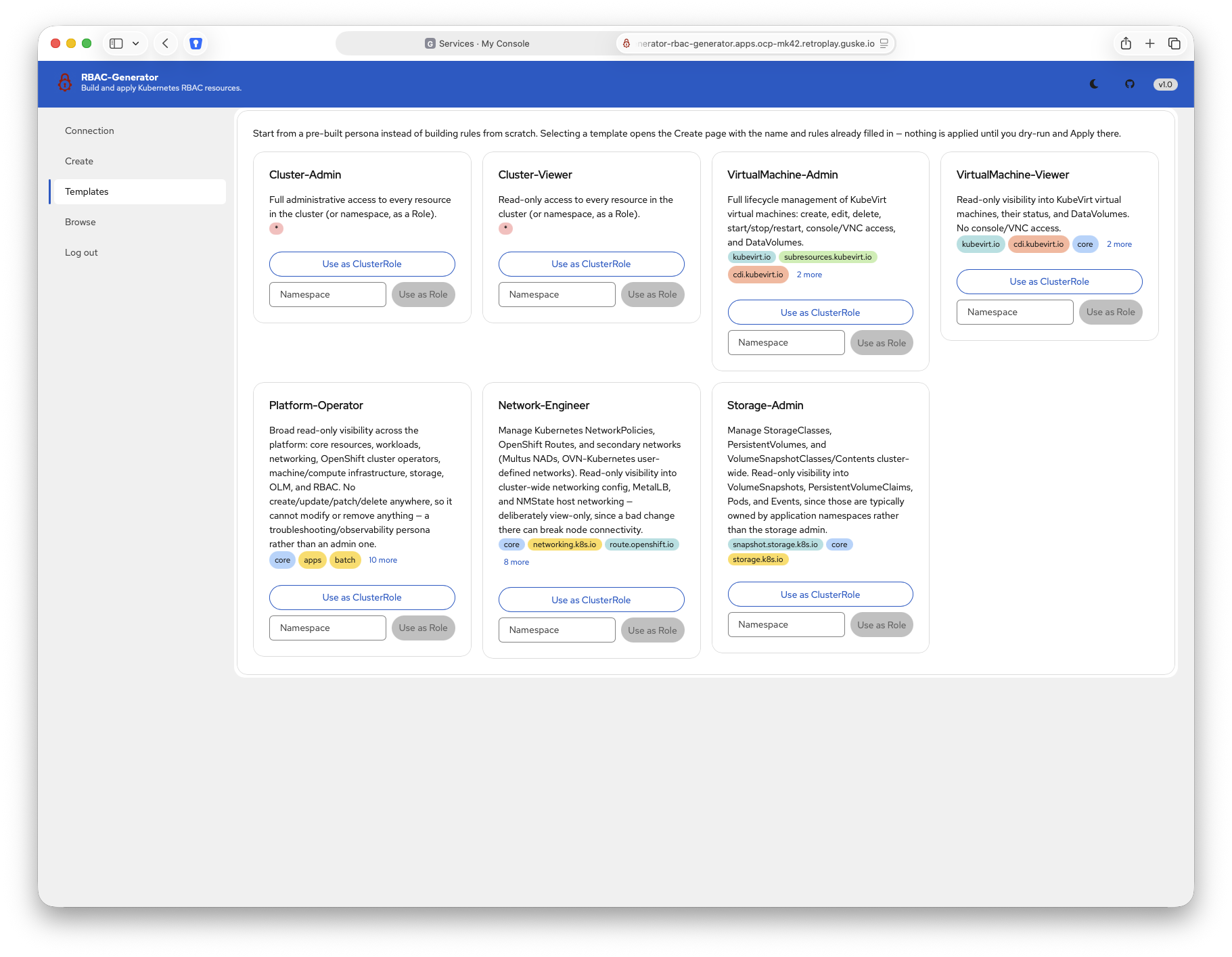
- Persona templates that pre-fill either a
ClusterRoleor a namespacedRole.- Personas are: Cluster-Admin, Cluster-Viewer, VirtualMachine-Admin, VirtualMachine-Viewer, Platform-Operator, Network-Engineer, and Storage-Admin.
- Light and dark mode 🤓
- A single shared login.
- One username and a bcrypt hash of the password, both set with environment variables.
- One container image, built entirely from Red Hat UBI images.
Building the Image
make image builds a local manifest named rbac-generator:v1.0 for linux/amd64 and linux/arm64. Every stage is a Red Hat UBI9 image.
| Stage | Image | What it does |
|---|---|---|
| UI build | registry.access.redhat.com/ubi9/nodejs-22 |
Builds the frontend |
| Binary build | registry.access.redhat.com/ubi9/go-toolset:1.25 |
Builds the Go binary and embeds the UI |
| Runtime | registry.access.redhat.com/ubi9/ubi-micro |
Final image: the static binary only |
Multi-arch is deliberate here. A plain podman build on an Apple Silicon Mac produces an arm64 image only and an amd64 node then fails at runtime with exec format error.
make image builds the local manifest localhost/rbac-generator:v1.0. latest is never used.
Pre-built images for the release are already published at quay.io/rguske/rbac-generator.
podman manifest inspect quay.io/rguske/rbac-generator:v1.0

{
    "schemaVersion": 2,
    "mediaType": "application/vnd.oci.image.index.v1+json",
    "manifests": [
        {
            "mediaType": "application/vnd.oci.image.manifest.v1+json",
            "size": 850,
            "digest": "sha256:5ba3b4f72b5c98c6202e1adbe217d3ea4c03bb11800620ef15c0cc2028feffac",
            "platform": {
                "architecture": "arm64",
                "os": "linux"
            }
        },
        {
            "mediaType": "application/vnd.oci.image.manifest.v1+json",
            "size": 850,
            "digest": "sha256:52ab2efac0a08e9dcb649d4211ea4b2de257f345db653f05bc21b522f64df3eb",
            "platform": {
                "architecture": "amd64",
                "os": "linux"
            }
        }
    ]
}
Build your own when you are customizing the app.
Running the Published Image
make hash-password is a Makefile target that runs backend/cmd/hashpw, so you need a clone of the repository not only the container image. The app has one username, APP_USERNAME, and one bcrypt hash of the password, APP_PASSWORD_HASH.
git clone https://github.com/rguske/rbac-generator.gitcd rbac-generatorpodman run --rm -p 8080:8080 \
-e APP_USERNAME=admin \
-e APP_PASSWORD_HASH="$(make hash-password PASSWORD=yourpassword)" \
quay.io/rguske/rbac-generator:v1.0Open http://localhost:8080 and log in with admin / yourpassword.
Brief Walkthrough
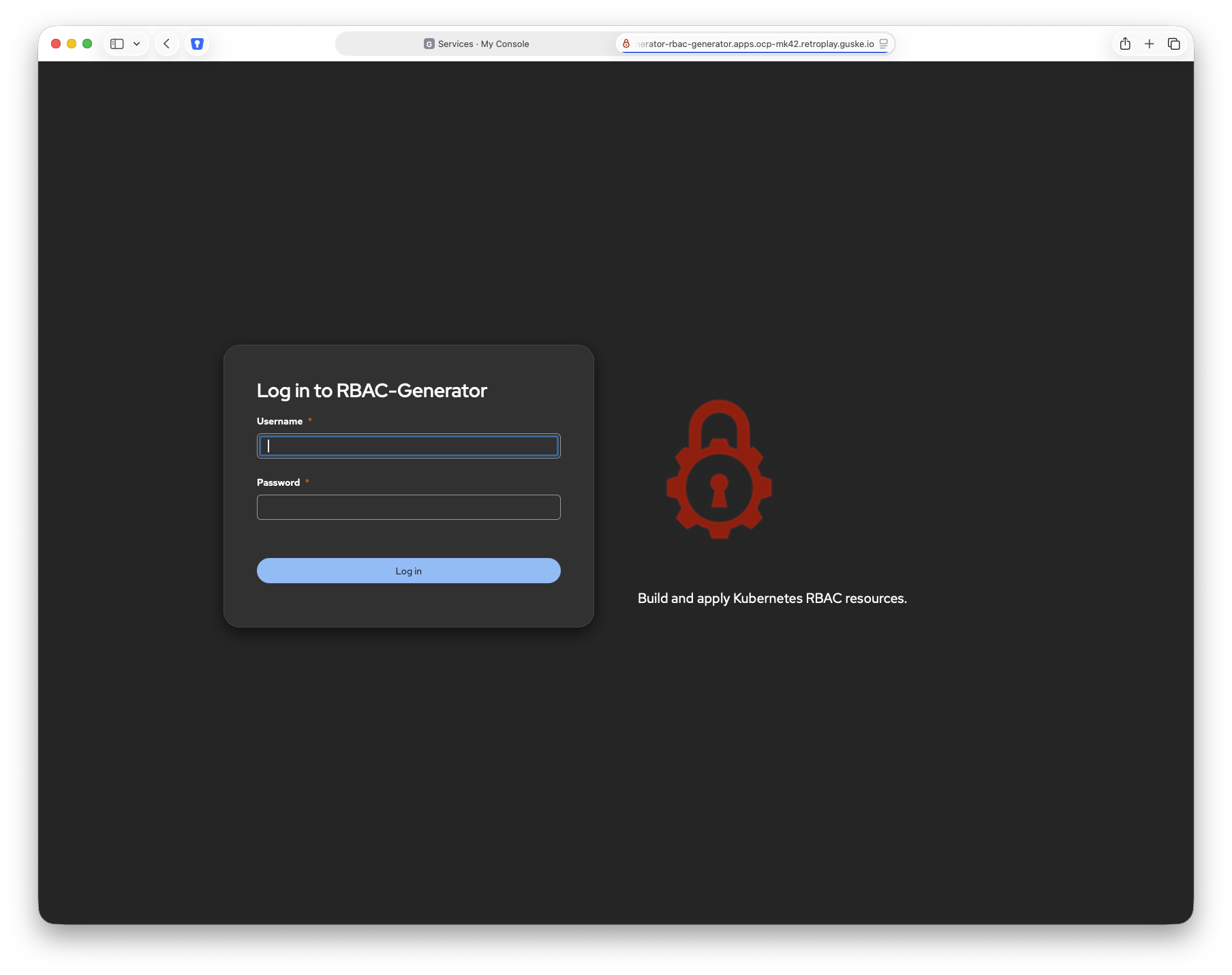
Login using your credentials (example credentials: admin / yourpassword)
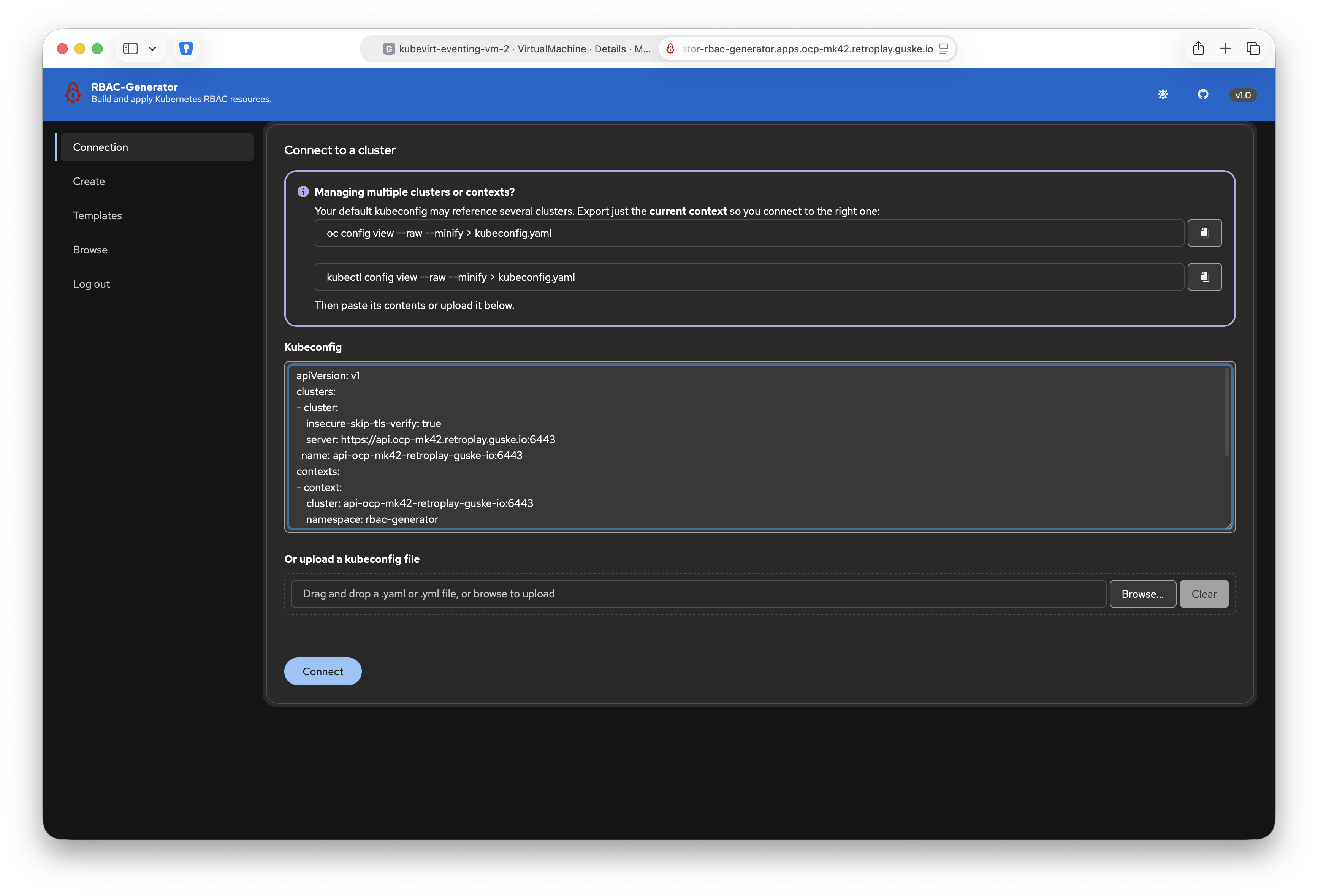
After you logged in you’ll land on the “Connect to a Cluster” page where you could establish a connection to your cluster. This will allow live API discovery, ServiceAccount lookup, server-side dry-run, and direct apply of created RBAC resources if wished.
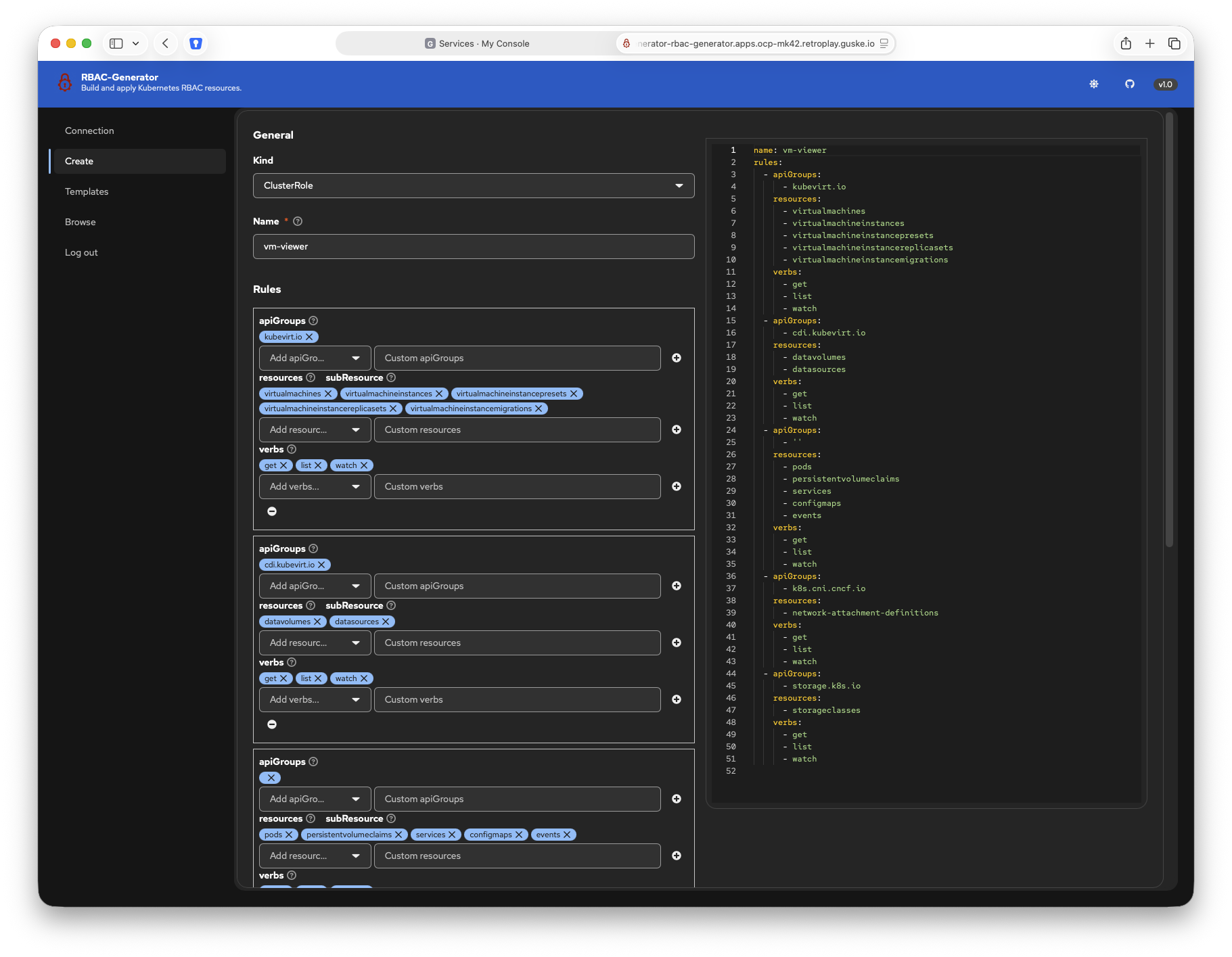
Creating these resources is done via the Create page. Pick the kind you want to create (Role, ClusterRole, RoleBinding, and ClusterRoleBinding), give it a unique name and define the rules. An established cluster connection comes in handy here, because the live API discovery let the RBAC-Generator know which ApiGroups are available in your cluster.
Nothing is more valuable than great feedback. One of my customers raised the feedback to have a dedicated section available which provides preconfigured templates for different platform personas.
Start from a pre-built persona instead of building rules from scratch. Selecting a template opens the Create page with the name and rules already filled in. Nothing is applied until you dry-run and Apply there.
Deploying to Kubernetes
The manifests under deploy/kustomize/base/ ship a Deployment, a Service, and a Route. They already reference quay.io/rguske/rbac-generator:v1.0.
- git clone https://github.com/rguske/rbac-generator.git
- cd rbac-generator
- Copy
deploy/kustomize/base/secret.example.yamltodeploy/kustomize/base/secret.yamland setAPP_PASSWORD_HASHto the output ofmake hash-password. - Apply the secret:
kubectl apply -f deploy/kustomize/base/secret.yaml - Apply the base:
kubectl apply -k deploy/kustomize/base
On vanilla Kubernetes, remove route.yaml from kustomization.yaml and add an Ingress.
Extra: Deploy as a Knative Service
In my OpenShift cluster, I’m deploying the RBAC-Generator application as a Knative Service.
The first 4 steps from the previous section remains the same. The Knative Service manifest is:
kubectl create -f - <<EOF
apiVersion: serving.knative.dev/v1
kind: Service
metadata:
  name: rbac-generator
  namespace: rbac-generator
spec:
  template:
    metadata:
      annotations:
        autoscaling.knative.dev/maxScale: '1'
        autoscaling.knative.dev/minScale: '1'
    spec:
      containerConcurrency: 0
      containers:
        - envFrom:
            - secretRef:
                name: rbac-generator-credentials
          image: 'quay.io/rguske/rbac-generator:v1.0'
          imagePullPolicy: Always
EOF
A routes.serving.knative.dev resource is part of a Knative Service and provides an URL which brings us to the beautiful 😉 RBAC-Generator website.
oc -n rbac-generator get routes.serving.knative.dev

NAME             URL                                                                      READY   REASON
rbac-generator   https://rbac-generator-rbac-generator.apps.ocp-mk42.retroplay.guske.io   True
Contributing
RBAC-Generator is licensed under the Apache License, Version 2.0. Clone rguske/rbac-generator and open an issue or a pull request.
Thanks for reading.