
KubeVirt meets Eventing: Automating VM Lifecycle Data with Knative and FaaS
Where this started - From Concept to Reality
This post builds directly on Monitoring Virtual Machines with Knative Eventing, an article I co-authored with my colleague Matthias Weßendorf on the official Knative blog a while ago. That post lays out the “what” and “why” nicely and concisely. Consider this one the deeper, hands-on, OpenShift-flavored companion with reproducible manifests you can copy-paste straight into your own cluster, plus a new addition that wasn’t part of the original article at all.
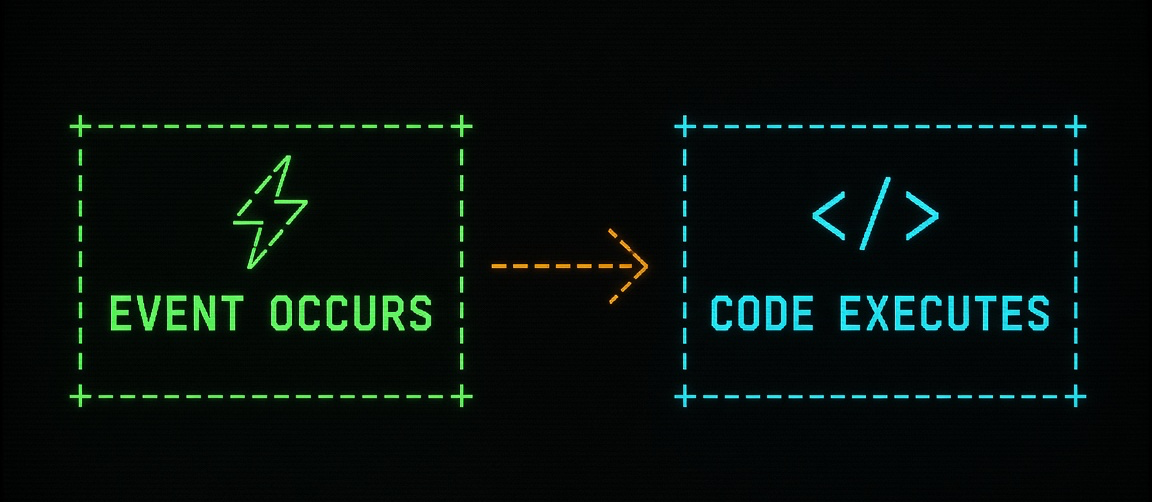
If you slightly touched upon some of my older articles, you know my passion for the topic “Eventing”. I still like the simple and effective concept of:
“EVENT OCCURS, CODE EXECUTES”.
One day at just another Red Hat OpenShift Virtualization1 introduction, it happened to me that my customer almost immediately dropped the following question at me: “Since OpenShift is a platform which treats both workloads, containers as well as virtual machines, as first-class citizens how big of a deal is it to use the power of Eventing to automatically update a CMDB database with information when a virtual machine gets created or deleted?”
You might think I made it up, don’t you? I can assure you, I don’t! Truth is, these weren’t the exact words the customer was using but this particular customer knew that I was part of the group behind the vCenter Event Broker Appliance (VEBA) project and therefore knew its potential as well as the use cases it addressed.
Virtual machine lifecycle operations such as create and delete already produces events on the Kubernetes API server. The trick is doing something useful with them the moment they happen, instead of ignoring them.
That’s exactly the gap Functions-as-a-Service (FaaS) and Knative Eventing fill. Knative Eventing is the backbone that gets Kubernetes-native events flowing reliably from A to B, and FaaS gives us a small, single-purpose piece of business logic that only runs when there’s actually an event worth acting on. No long-running polling service, no cron job, just a function that wakes up, does its one job, and goes back to sleep.
Architecture at a Glance
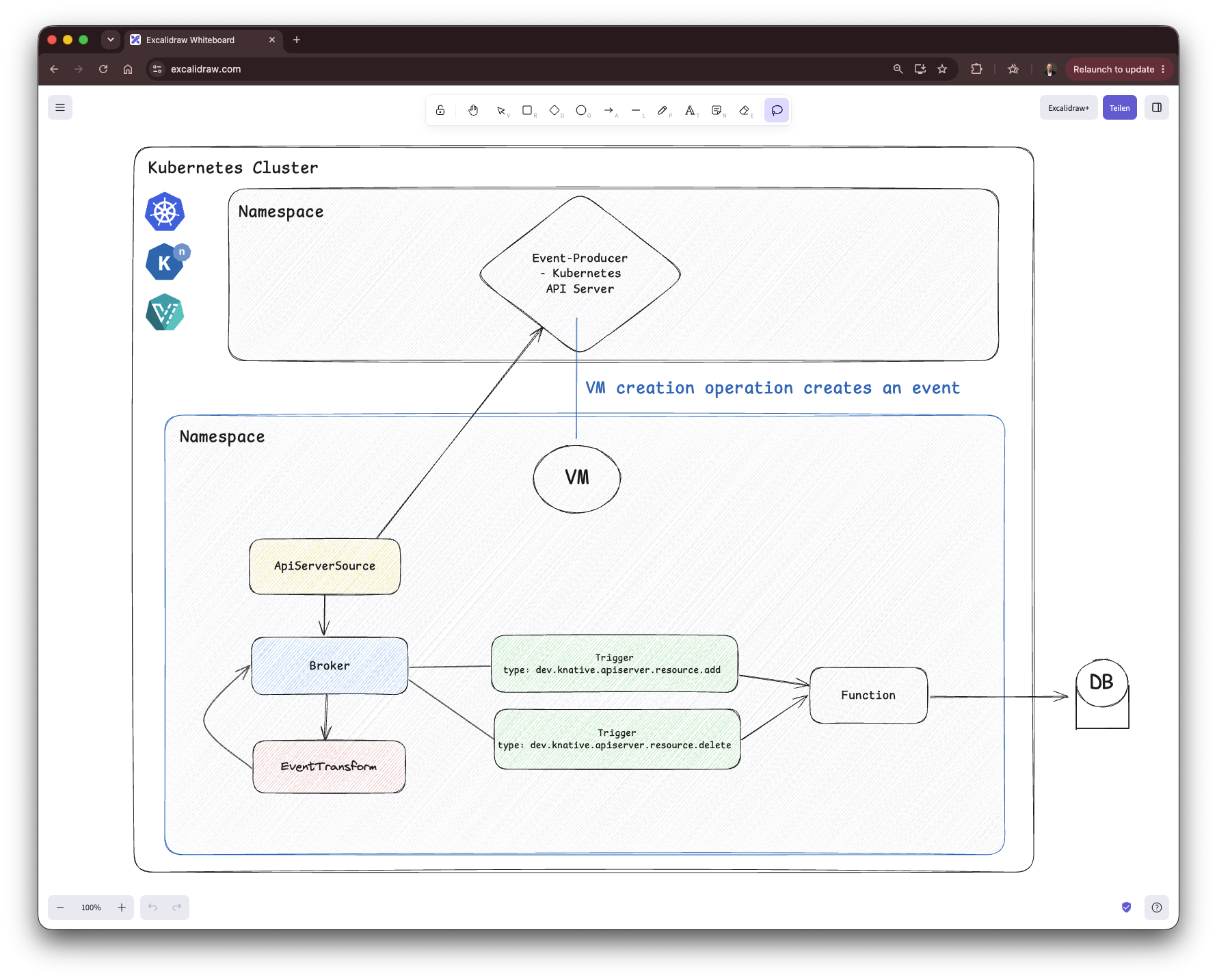
Let’s walk through the diagram hop by hop, since every box in there is a piece we’ll actually deploy later in this post:
- Kubernetes API Server - the event producer. The moment a
VirtualMachinegets created or deleted, the API server is where that fact first exists as an event. ApiServerSource- a Knative Eventing source watching the API server for exactly that kind of resource. It picks up the create/delete operation and forwards it as a CloudEvent.Broker- the central routing point. TheApiServerSourcesends its event here first.EventTransform- the raw event coming out of the API server is huge and mostly irrelevant to us (full VM spec, status, metadata, you name it).EventTransformtrims it down to just the fields we care about like e.g. name, namespace, CPU, etc. and hands the slimmed-down event back to theBroker(could also be another broker or another entity in general like e.g. a function).Triggers - filtered ondev.knative.apiserver.resource.addand ondev.knative.apiserver.resource.delete. EachTriggerwatches theBrokerfor its specific event type and, when it matches, invokes the same downstream subscriber.- The Function - a Knative Function ƒ(x) written in Python (can be in any programming language) that receives the transformed event and writes (or removes) the corresponding row.
- Database - the actual “CMDB” DB, always reflecting the current state of VMs in the cluster.
What Is the Event Transformer?
Step 4 in the list above deserves its own explanation before we start deploying anything. The ApiServerSource doesn’t just tell you “a VM named e.g. rhel-vm was created”, it forwards the entire Kubernetes API object for that VirtualMachine, wrapped in a CloudEvent. That’s the full spec, the full status, all the metadata Kubernetes tracks internally, easily a few hundred lines of JSON for something as simple as a VM create event. Great for completeness, not so great when all a small Python function actually needs is a name, a namespace, and a handful of spec fields.
Here’s a trimmed, illustrative excerpt of what that raw dev.knative.apiserver.resource.add event looks like (real payloads are considerably longer, this is not the full object):
Context Attributes,
  specversion: 1.0
  type: dev.knative.apiserver.resource.add
  source: https://172.30.0.1:443
  subject: /apis/kubevirt.io/v1/namespaces/kubevirt-eventing/virtualmachines/rhel-vm
  id: 5508cafb-3332-4709-a1b1-a8657111d82c
  time: 2025-07-07T13:02:18.124604417Z
  datacontenttype: application/json
Extensions,
  apiversion: kubevirt.io/v1
  kind: VirtualMachine
  knativearrivaltime: 2025-07-07T13:02:18.132189108Z
  name: rhel-vm
  namespace: kubevirt-eventing
Data,
  {
    "apiVersion": "kubevirt.io/v1",
    "kind": "VirtualMachine",
    "metadata":
      "creationTimestamp": "2025-07-07T13:02:18Z",

// output omitted

      ],
      "name": "rhel-vm",
      "namespace": "kubevirt-eventing",
      "resourceVersion": "35172905",
      "uid": "17160b0a-9f0b-461c-9d6c-f1e477dacf93"
    },

// output omitted

        "spec": {
          "architecture": "amd64",
          "domain": {
            "cpu": {
              "cores": 4,
              "sockets": 2,
              "threads": 1
            },

/// output omitted

              ],
              "interfaces": [
                {
                  "bridge": {},
                  "name": "default"
                }
              ]
            },
            "machine": {
              "type": "pc-q35-rhel9.2.0"
            },
            "memory": {
              "guest": "8Gi"
            },
            "resources": {}
          },
          "networks": [
            {
              "name": "default",
              "pod": {}
            }
          ],

/// output omitted
That’s exactly the “trims the fat” problem the EventTransform API solves. Introduced in Knative Eventing v1.18, EventTransform is a CRD that uses JSONata expressions to reshape a CloudEvent’s payload in-flight, picking out only the attributes you care about and dropping everything else. It’s a standalone building block too, not tied to any single source or sink, so it can sit anywhere in your event flow. Right after the Broker or in front of a Trigger…wherever trimming makes sense for that hop.
We won’t write the JSONata expression itself just yet, that’s coming up next, where we configure EventTransform to emit exactly the columns our DB expects: name, namespace, instanceType, CPU cores, CPU sockets, memory, storage size, storage class, and network.
Prerequisites
Everything from here on assumes Knative Serving and Eventing (or, on OpenShift, the OpenShift Serverless Operator) plus KubeVirt/OpenShift Virtualization are already installed and healthy on the cluster.
This section covers only the Knative/Serverless half of that equation, getting KubeVirt itself running is a separate exercise and out of scope here, KubeVirt’s own quickstart is the place to start if you need it.
The OpenShift Serverless Operator
The OpenShift Serverless Operator is the fastest path. It manages Knative Serving, Knative Eventing as well as Knative Kafka. So one Operator lifecycle to watch instead of three.
Two easy ways of installation:
- Via the OpenShift WebConsole - straight ⏩:
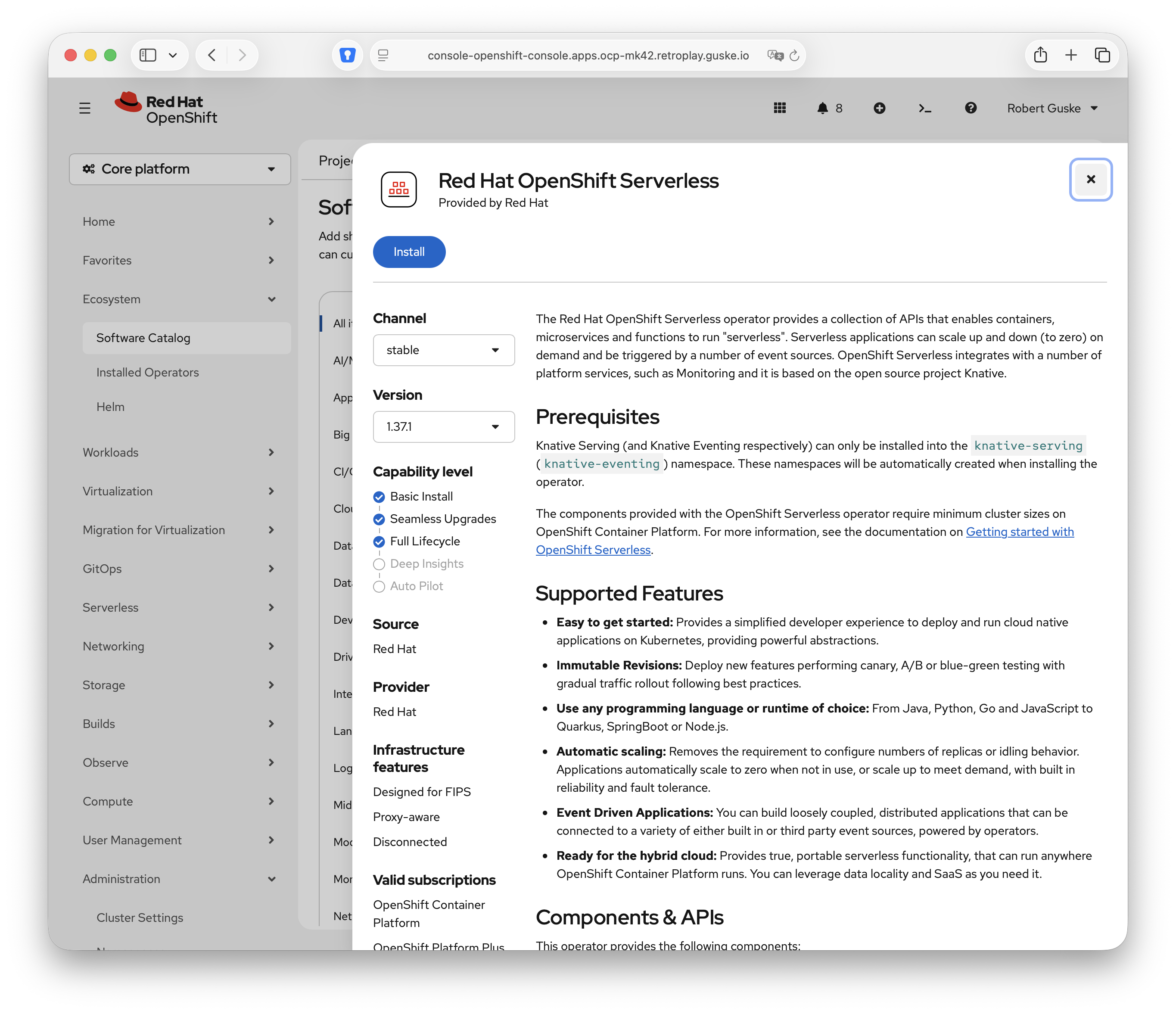
- Declarative as Kubernetes resource manifests (
Namespace,OperatorGroup, andSubscription):
oc create -f - <<EOF
---
apiVersion: v1
kind: Namespace
metadata:
  name: openshift-serverless
---
apiVersion: operators.coreos.com/v1
kind: OperatorGroup
metadata:
  name: serverless-operators
  namespace: openshift-serverless
spec: {}
---
apiVersion: operators.coreos.com/v1alpha1
kind: Subscription
metadata:
  name: serverless-operator
  namespace: openshift-serverless
spec:
  channel: stable
  name: serverless-operator
  source: redhat-operators
  sourceNamespace: openshift-marketplace
  installPlanApproval: Automatic
EOF
Give it a moment, then confirm the cluster service version has reached Succeeded:
oc get csv | grep serverless

serverless-operator.v1.37.1             Red Hat OpenShift Serverless        1.37.1                          serverless-operator.v1.37.0             Succeeded
With the Operator in place, install Knative Serving:
oc create -f - <<EOF
apiVersion: operator.knative.dev/v1beta1
kind: KnativeServing
metadata:
  name: knative-serving
  namespace: knative-serving
EOF
oc get knativeserving.operator.knative.dev/knative-serving -n knative-serving --template='{{range .status.conditions}}{{printf "%s=%s\n" .type .status}}{{end}}'
DependenciesInstalled=True
DeploymentsAvailable=True
InstallSucceeded=True
Ready=True
VersionMigrationEligible=TrueSame pattern for Knative Eventing, this is the piece that actually matters for everything below, Broker, Trigger, ApiServerSource, and EventTransform all live here:
oc create -f - <<EOF
apiVersion: operator.knative.dev/v1beta1
kind: KnativeEventing
metadata:
  name: knative-eventing
  namespace: knative-eventing
EOF
oc get knativeeventing.operator.knative.dev/knative-eventing -n knative-eventing --template='{{range .status.conditions}}{{printf "%s=%s\n" .type .status}}{{end}}'Once that reports InstallSucceeded=True and Ready=True alongside the same result for knativeserving, Knative is ready to serve.
Everywhere Else: Upstream Knative Serving and Eventing
Not on OpenShift? Install upstream Knative Serving and Eventing directly. For a supported, long-term install on any Kubernetes cluster, the Knative Operator gives you the same CRD-driven approach used above.
For quick local experimentation, the Knative Quickstart’s kn plugin spins up a kind/minikube cluster with Serving and Eventing already wired together in a couple of commands, useful for kicking the tyres, not for production.
Either way, no manifests to paste here, everything from “Deploying the Event Pipeline” onward is plain oc/kubectl resources and doesn’t care which install path got you to a healthy knative-serving/knative-eventing pair.
Deploying the Event Pipeline
Theory’s out of the way, time to actually roll this out on an OpenShift cluster. Everything below is applied in order, since later objects reference the names created earlier.
Setting the Stage: Brokers & RBAC
We deploy two Brokers rather than one: broker-apiserversource receives the raw, untrimmed events straight from the ApiServerSource, while broker-eventtransform only ever sees the already-trimmed events coming out of EventTransform. Keeping them separate is basically part of the demo. It provides the ability to send the payloads to e.g. an EventViewer application. More later in this post.
Create both brokers in your desired namespace:
NAMESPACE=kubevirt-eventingoc create -f - <<EOF
---
apiVersion: v1
kind: Namespace
metadata:
name: ${NAMESPACE}
EOFOn OpenShift, simply oc new-project kubevirt-eventing.
oc create -f - <<EOF
apiVersion: eventing.knative.dev/v1
kind: Broker
metadata:
  name: broker-apiserversource
  namespace: ${NAMESPACE}
spec: {}
---
apiVersion: eventing.knative.dev/v1
kind: Broker
metadata:
  name: broker-eventtransform
  namespace: ${NAMESPACE}
spec: {}
EOF
Neither Broker has a spec beyond its name, that’s the in-memory backed, no-frills default, perfectly fine to get started with.
The ApiServerSource we’re about to create doesn’t get to watch cluster resources for free. By default there’s no ServiceAccount with permission to get/list/watch VirtualMachine/VirtualMachineInstance objects, so we need a dedicated ServiceAccount plus a ClusterRole/ClusterRoleBinding granting exactly that:
oc create -f - <<EOF
apiVersion: v1
kind: ServiceAccount
metadata:
  name: events-sa
  namespace: ${NAMESPACE}
---
apiVersion: rbac.authorization.k8s.io/v1
kind: ClusterRole
metadata:
  name: vm-event-watcher
rules:
  - apiGroups:
      - kubevirt.io
    resources:
      - virtualmachines
      - virtualmachineinstances
    verbs:
      - get
      - list
      - watch
---
apiVersion: rbac.authorization.k8s.io/v1
kind: ClusterRoleBinding
metadata:
  name: vm-event-watcher
roleRef:
  apiGroup: rbac.authorization.k8s.io
  kind: ClusterRole
  name: vm-event-watcher
subjects:
  - kind: ServiceAccount
    name: events-sa
    namespace: kubevirt-eventing
EOFRole with an appropriate RoleBinding OR and this is what I suggest in the next ApiServerSource section, using namespaceSelectors.Wiring Up the ApiServerSource
With the plumbing in place, we can finally create the ApiServerSource itself. The important bit here is mode: Resource. Instead of forwarding the generic, small Kubernetes Event objects (the kind you see with oc get events), mode: Resource makes the source watch the actual resource listed under resources and emit a CloudEvent carrying that resource’s full current state every time it changes.
We scope it to exactly one apiVersion/kind pair, kubevirt.io/v1 VirtualMachine, so we only hear about VM lifecycle changes and nothing else running in the cluster. The source authenticates as the events-sa ServiceAccount we just created, and sinks its events straight into broker-apiserversource:
oc create -f - <<EOF
apiVersion: sources.knative.dev/v1
kind: ApiServerSource
metadata:
  name: apiserversource
  namespace: ${NAMESPACE}
  labels:
    app: apiserversource
spec:
  namespaceSelector:
    matchLabels:
      eventing: enabled
  mode: Resource
  resources:
    - apiVersion: kubevirt.io/v1
      kind: VirtualMachine
  serviceAccountName: events-sa
  sink:
    ref:
      apiVersion: eventing.knative.dev/v1
      kind: Broker
      name: broker-apiserversource
EOF
From this point on, every VirtualMachine which gets created or deleted in the cluster/in the labeled namespaces (oc label namespace ${NAMESPACE} eventing=enabled) shows up as a dev.knative.apiserver.resource.add / dev.knative.apiserver.resource.delete CloudEvent inside broker-apiserversource, looking exactly like the verbose payload referenced earlier.
This is what the apiserversource pod in my lab is showing in the logs:
{"level":"info","ts":"2026-09-21T14:38:44.148Z","caller":"apiserver/adapter.go:87","msg":"STARTING -- apiserver.Config{Namespaces:[]string{\"dev-a\", \"dev-b\", \"kubevirt-eventing\"}, AllNamespaces:false,Notice the listed namespaces dev-a, dev-b and kubevirt-eventing.
Transforming the Event
Next on our list, is the piece that actually does the trimming. An EventTransform named vmdata-transform, sinking its output into the second Broker, broker-eventtransform:
oc create -f - <<EOF
apiVersion: eventing.knative.dev/v1alpha1
kind: EventTransform
metadata:
  name: vmdata-transform
  namespace: ${NAMESPACE}
spec:
  sink:
    ref:
      apiVersion: eventing.knative.dev/v1
      kind: Broker
      name: broker-eventtransform
  jsonata:
    expression: |
      {
        "specversion": specversion,
        "type": type,
        "source": source,
        "id": id,
        "time": time,
        "datacontenttype": "application/json",
        "data": {
          "type": type,
          "id": id,
          "kind": kind,
          "name": name,
          "namespace": namespace,
          "time": time,
          "instancetype": data.spec.instancetype.name,
          "cpucores": $exists(data.spec.template.spec.domain.cpu.cores)
            ? data.spec.template.spec.domain.cpu.cores
            : null,
          "cpusockets": $exists(data.spec.template.spec.domain.cpu.sockets)
            ? data.spec.template.spec.domain.cpu.sockets
            : null,
          "memory": $exists(data.spec.template.spec.domain.memory.guest)
            ? data.spec.template.spec.domain.memory.guest
            : null,
          "storageclass": data.spec.dataVolumeTemplates[0].spec.storage.storageClassName,
          "network": data.spec.template.spec.networks[0].multus.networkName
        }
      }
EOF
Mapping this back to the raw event excerpt from earlier:
cpucoresandcpusocketscome straight fromdata.spec.template.spec.domain.cpu.cores/.sockets(4and2forrhel-vm) –> if$exists! If notnull(becauseinstancetypeis different)memoryfromdata.spec.template.spec.domain.memory.guest(8Gi) – if$exists! If notnull(becauseinstancetypeis different)storageclassfrom the VM’sdataVolumeTemplatesentry (30Gionsynology-iscsi)networkfromdata.spec.template.spec.networks[].name(default)
Once this is in place, the broker broker-eventtransform only receives a fraction of the size of the original CloudEvent (json payload).
Output will be something like this:
# CONTEXT ATTRIBUTES
{
  "datacontenttype": "application/json",
  "id": "635f743c-43b6-4b5b-8c5f-6c4fcc7011c9",
  "source": "https://172.30.0.1:443",
  "specversion": "1.0",
  "time": "2026-09-22 12:32:32.714000+00:00",
  "type": "dev.knative.apiserver.resource.add"
}
# EXTENSIONS
{
  "knativearrivaltime": "2026-09-22T12:32:32.823610877Z"
}
# DATA
{
  "cpucores": 1,
  "cpusockets": 1,
  "id": "635f743c-43b6-4b5b-8c5f-6c4fcc7011c9",
  "kind": "VirtualMachine",
  "memory": "2Gi",
  "name": "rusk-vm",
  "namespace": "dev-a",
  "network": "cudn-dev-a-vlan50",
  "time": "2026-09-22T12:32:32.714Z",
  "type": "dev.knative.apiserver.resource.add"
}
That’s exactly the shape our downstream function needs, no more, no less. Lovely!
Triggers: Routing Add/Delete Events
The last piece connecting broker-apiserversource to vmdata-transform is a pair of Triggers. A Trigger binds a Broker to a subscriber via an event-type filter:
“Events matching this filter are routed from the
Brokerto the subscriber.”
Here, trigger-transformer-vm-created matches dev.knative.apiserver.resource.add and trigger-transformer-vm-delete matches dev.knative.apiserver.resource.delete, both forwarding to the vmdata-transform EventTransform we just created, with a small retry policy in case the transform is momentarily unavailable:
oc create -f - <<EOF
apiVersion: eventing.knative.dev/v1
kind: Trigger
metadata:
  labels:
    eventing.knative.dev/broker: broker-apiserversource
  name: trigger-transformer-vm-created
  namespace: ${NAMESPACE}
spec:
  broker: broker-apiserversource
  filter:
    attributes:
      type: dev.knative.apiserver.resource.add
  subscriber:
    ref:
      apiVersion: eventing.knative.dev/v1alpha1
      kind: EventTransform
      name: vmdata-transform
  delivery:
    retry: 1
    backoffPolicy: linear
    backoffDelay: PT5S
---
apiVersion: eventing.knative.dev/v1
kind: Trigger
metadata:
  labels:
    eventing.knative.dev/broker: broker-apiserversource
  name: trigger-transformer-vm-deleted
  namespace: ${NAMESPACE}
spec:
  broker: broker-apiserversource
  filter:
    attributes:
      type: dev.knative.apiserver.resource.delete
  subscriber:
    ref:
      apiVersion: eventing.knative.dev/v1alpha1
      kind: EventTransform
      name: vmdata-transform
  delivery:
    retry: 1
    backoffPolicy: linear
    backoffDelay: PT5S
EOF
With this in place, the full pipeline is live end to end: VirtualMachine create/delete –> ApiServerSource –> broker-apiserversource –> Trigger –> EventTransform –> broker-eventtransform. The only thing missing now is something actually subscribing to broker-eventtransform and doing something useful with those trimmed events, which is exactly where the Knative Function comes in.
Event Display Applications
Before we’re getting to the deployment of the Knative ƒ(x) itself, we’ll deploy an Event-Display application first, which perfectly come in handy when it comes to displaying the actual payload the funtion(s) will receive.
Listed below are four event-display examples:
- My kn-py-cedash application – provides a webpage
- My kn-py-echo - simple
echotostdout/ accessible via logs of the pod - Sockeye by Scott Nichols - provides a webpage
- Showcase by Red Hat - provides a webpage
Deploy an Event-Display Application for each Broker
We’re going to deploy my created kn-py-cedash event-display for the sake of the demo. This event-display application will be deployed as a Knative Service (ksvc) and provides a simple webpage which will display all incoming events from type dev.knative.apiserver.resource.add and dev.knative.apiserver.resource.delete (configured in the triggers).
NAMESPACE="kubevirt-eventing"oc create -f - <<EOF
apiVersion: serving.knative.dev/v1
kind: Service
metadata:
name: kn-py-cedash-fn-raw-ce
namespace: ${NAMESPACE}
spec:
template:
metadata:
annotations:
autoscaling.knative.dev/maxScale: "1"
autoscaling.knative.dev/minScale: "1"
spec:
imagePullPolicy: always
containers:
- image: quay.io/rguske/kn-py-cedash:1.2
---
apiVersion: eventing.knative.dev/v1
kind: Trigger
metadata:
labels:
eventing.knative.dev/broker: broker-apiserversource
name: trigger-py-cedash-fn-raw-ce-vm-created
namespace: ${NAMESPACE}
spec:
broker: broker-apiserversource
filter:
attributes:
type: dev.knative.apiserver.resource.add
subscriber:
ref:
apiVersion: serving.knative.dev/v1
kind: Service
name: kn-py-cedash-fn-raw-ce
delivery:
retry: 1
backoffPolicy: linear
backoffDelay: PT5S
---
apiVersion: eventing.knative.dev/v1
kind: Trigger
metadata:
labels:
eventing.knative.dev/broker: broker-apiserversource
name: trigger-py-cedash-fn-raw-ce-vm-deleted
namespace: ${NAMESPACE}
spec:
broker: broker-apiserversource
filter:
attributes:
type: dev.knative.apiserver.resource.delete
subscriber:
ref:
apiVersion: serving.knative.dev/v1
kind: Service
name: kn-py-cedash-fn-raw-ce
delivery:
retry: 1
backoffPolicy: linear
backoffDelay: PT5S
EOFThe beauty of deploying it as a Knative Service is that a route object is part of it which will serve a browsable url:
oc get routes.serving.knative.dev

NAME              URL                                                                          READY   REASON
kn-py-cedash-fn-raw-ce   https://kn-py-cedash-fn-raw-ce-kubevirt-eventing.apps.ocp-mk42.retroplay.guske.io   True
curl -I https://kn-py-cedash-fn-raw-ce-kubevirt-eventing.apps.ocp-mk42.retroplay.guske.io
HTTP/1.1 200 OK
content-length: 13678
content-type: text/html; charset=utf-8
date: Tue, 22 Sep 2026 07:58:09 GMT
server: envoy
x-envoy-upstream-service-time: 3
set-cookie: de26ff32c39b9f551c4a76aa96d4460c=470c77e73ea3b7ffa8480027b15dbe83; path=/; HttpOnlyThis is how it shows up in your browser:
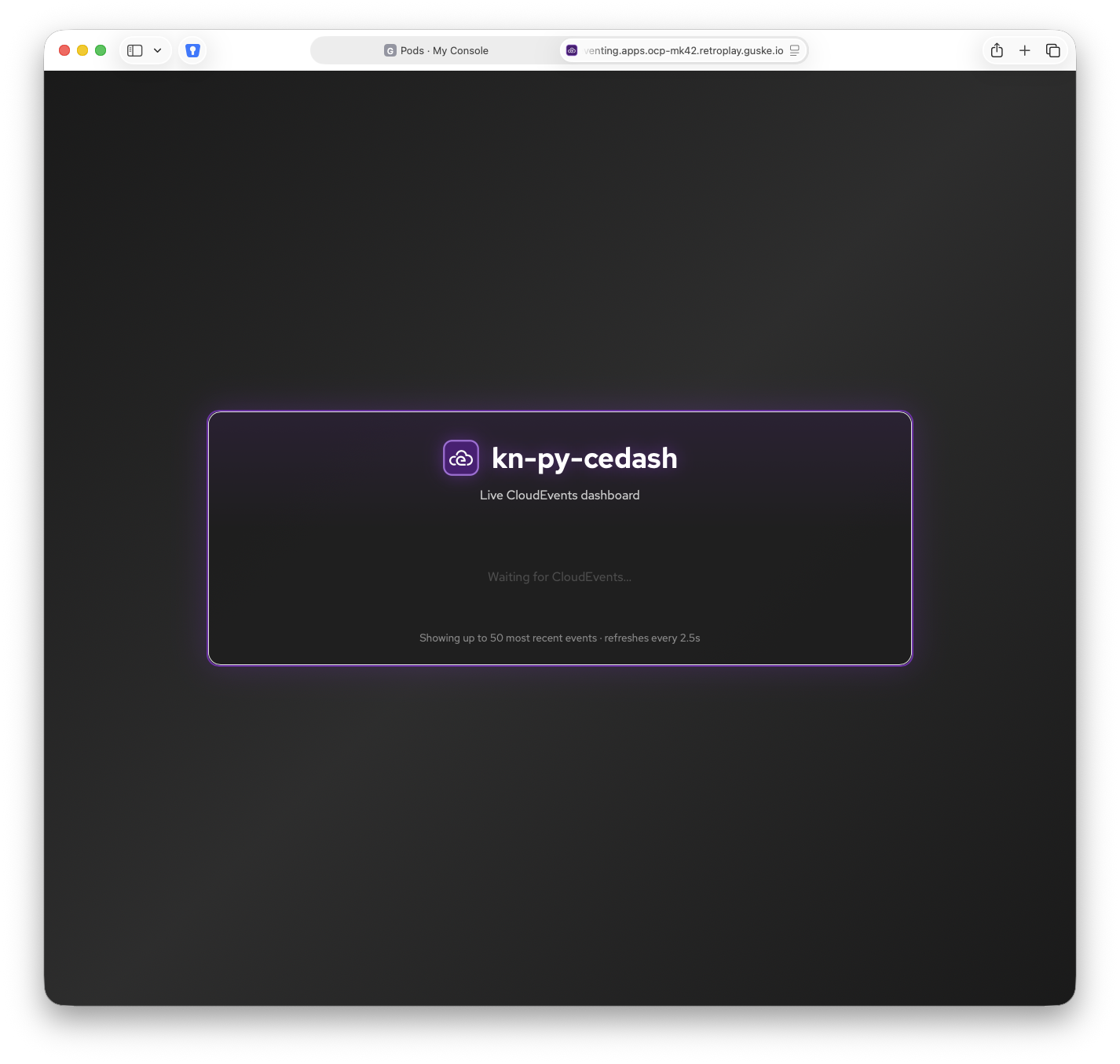
Configure a second one for the broker-eventtransform as well. Make sure that you specify unique names for both functions. Like e.g. kn-py-cedash-fn-raw-ce and kn-py-cedash-fn-trimmed-ce.
NAMESPACE="kubevirt-eventing"oc apply -f - <<EOF
apiVersion: serving.knative.dev/v1
kind: Service
metadata:
name: kn-py-cedash-fn-trimmed-ce
namespace: ${NAMESPACE}
spec:
template:
metadata:
annotations:
autoscaling.knative.dev/maxScale: "1"
autoscaling.knative.dev/minScale: "1"
spec:
imagePullPolicy: always
containers:
- image: quay.io/rguske/kn-py-cedash:1.2
---
apiVersion: eventing.knative.dev/v1
kind: Trigger
metadata:
labels:
eventing.knative.dev/broker: broker-eventtransform
name: trigger-py-cedash-fn-trimmed-ce-vm-created
namespace: ${NAMESPACE}
spec:
broker: broker-eventtransform
filter:
attributes:
type: dev.knative.apiserver.resource.add
subscriber:
ref:
apiVersion: serving.knative.dev/v1
kind: Service
name: kn-py-cedash-fn-trimmed-ce
delivery:
retry: 1
backoffPolicy: linear
backoffDelay: PT5S
---
apiVersion: eventing.knative.dev/v1
kind: Trigger
metadata:
labels:
eventing.knative.dev/broker: broker-eventtransform
name: trigger-py-cedash-fn-trimmed-ce-vm-deleted
namespace: ${NAMESPACE}
spec:
broker: broker-eventtransform
filter:
attributes:
type: dev.knative.apiserver.resource.delete
subscriber:
ref:
apiVersion: serving.knative.dev/v1
kind: Service
name: kn-py-cedash-fn-trimmed-ce
delivery:
retry: 1
backoffPolicy: linear
backoffDelay: PT5S
EOFWe ultimately have now two event-displays which will help reading the created event payload. Therefore, if you create or delete a VM, the event will show up in both kn-py-cedash-fn dashboards:
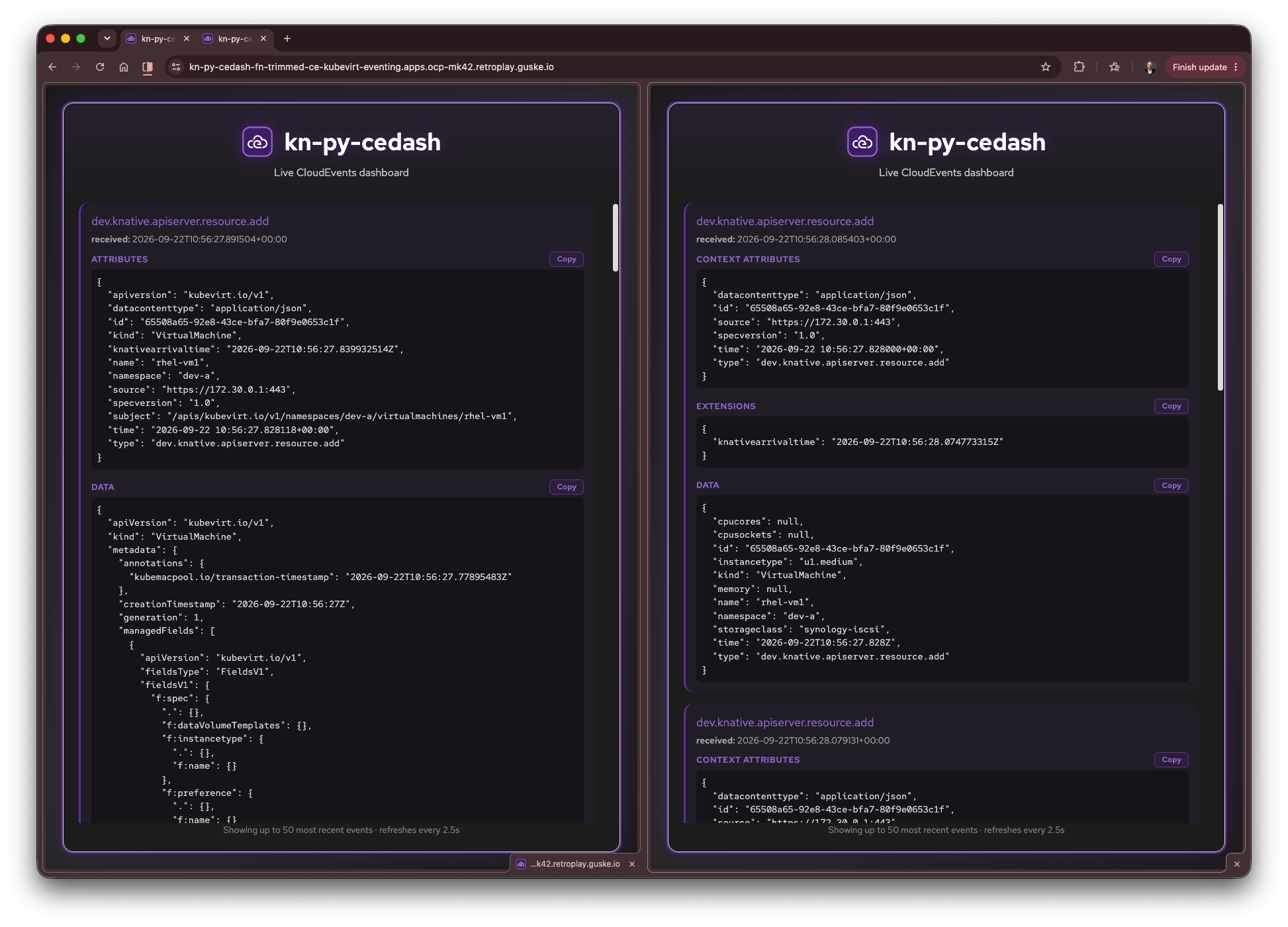
To sum this up. You should now have one apiserversource, two brokers, six triggers, one eventtransform and two (Knative) services in place.
oc get apiserversource,broker,trigger,eventtransform,ksvc

NAME                                                  SINK                                                                                                AGE     READY   REASON
apiserversource.sources.knative.dev/apiserversource   http://broker-ingress.knative-eventing.svc.cluster.local/kubevirt-eventing/broker-apiserversource   5d18h   True

NAME                                                 URL                                                                                                 AGE     READY   REASON
broker.eventing.knative.dev/broker-apiserversource   http://broker-ingress.knative-eventing.svc.cluster.local/kubevirt-eventing/broker-apiserversource   5d19h   True
broker.eventing.knative.dev/broker-eventtransform    http://broker-ingress.knative-eventing.svc.cluster.local/kubevirt-eventing/broker-eventtransform    5d19h   True

NAME                                                                       BROKER                   SUBSCRIBER_URI                                                          AGE     READY   REASON
trigger.eventing.knative.dev/trigger-py-cedash-fn-raw-ce-vm-created        broker-apiserversource   http://kn-py-cedash-fn-raw-ce.kubevirt-eventing.svc.cluster.local       40m     True
trigger.eventing.knative.dev/trigger-py-cedash-fn-raw-ce-vm-deleted        broker-apiserversource   http://kn-py-cedash-fn-raw-ce.kubevirt-eventing.svc.cluster.local       40m     True
trigger.eventing.knative.dev/trigger-py-cedash-fn-trimmed-ce-vm-created    broker-eventtransform    http://kn-py-cedash-fn-trimmed-ce.kubevirt-eventing.svc.cluster.local   40m     True
trigger.eventing.knative.dev/trigger-py-cedash-fn-trimmed-ce-vm-deleted    broker-eventtransform    http://kn-py-cedash-fn-trimmed-ce.kubevirt-eventing.svc.cluster.local   40m     True
trigger.eventing.knative.dev/trigger-transformer-vm-created                broker-apiserversource   http://vmdata-transform-jsonata.kubevirt-eventing.svc.cluster.local     4d12h   True
trigger.eventing.knative.dev/trigger-transformer-vm-deleted                broker-apiserversource   http://vmdata-transform-jsonata.kubevirt-eventing.svc.cluster.local     4d12h   True

NAME                                                   URL                                                                   SINK                                                                                               READY   REASON
eventtransform.eventing.knative.dev/vmdata-transform   http://vmdata-transform-jsonata.kubevirt-eventing.svc.cluster.local   http://broker-ingress.knative-eventing.svc.cluster.local/kubevirt-eventing/broker-eventtransform   True

NAME                                                     URL                                                                                     LATESTCREATED                      LATESTREADY                        READY   REASON
service.serving.knative.dev/kn-py-cedash-fn-raw-ce       https://kn-py-cedash-fn-raw-ce-kubevirt-eventing.apps.ocp-mk42.retroplay.guske.io       kn-py-cedash-fn-raw-ce-00001       kn-py-cedash-fn-raw-ce-00001       True
service.serving.knative.dev/kn-py-cedash-fn-trimmed-ce   https://kn-py-cedash-fn-trimmed-ce-kubevirt-eventing.apps.ocp-mk42.retroplay.guske.io   kn-py-cedash-fn-trimmed-ce-00001   kn-py-cedash-fn-trimmed-ce-00001   True
The PostgreSQL Backend
Everything up to this point has been about getting events into the right shape and to the right place. The other half of the “CMDB-like PostgreSQL table” idea from the introduction is the database itself. A StatefulSet-backed PostgreSQL instance sitting behind a Kubernetes Service.
To be upfront about it, what’s running here is homelab/demo-grade. A single replica backed by ReadWriteOnce PersistentVolumeClaims, not something you’d take to production as-is. That’s fine for this post though, because the interesting part isn’t the StatefulSet, it’s the schema. Swap this out for any Postgres instance or Operator you already have reachable from your cluster, as long as it can run the CREATE TABLE statement coming up below, it’ll work just as well.
A simple PostgreSQL StatefulSet
If you don’t have an existing instance or a quickly deployable example available, use my postgresql-statefulset-example:
oc -n postgresql create -k 'github.com/rguske/postgresql-statefulset-example/base?ref=main'If you’re running into the following error, you might should check your storageClass for the configured fsType.
I initially haven’t specified one and after configuring it using fsType=ext4, it worked.
You can check a PV in order to get the configuration:
PV=$(oc -n postgresql get pvc postgres-data-pvc \
  -o jsonpath='{.spec.volumeName}')
oc get pv $PV \
-o jsonpath='fsType={.spec.csi.fsType}{"\n"}accessMode={.spec.accessModes[*]}{"\n"}'
fsType=ext4
accessMode=ReadWriteOnceValidate the connection to the PostgreSQL instance by using the psql cli (download here). Keep in mind, using my example and for the sake of simplicity, we’ve deployed a Kubernetes Service type NodePort:
oc get svc
NAME                TYPE        CLUSTER-IP       EXTERNAL-IP   PORT(S)          AGE
postgres-nodeport   NodePort    172.30.205.134   <none>        5432:30432/TCP   85m
postgres-svc        ClusterIP   172.30.38.80     <none>        5432/TCP         85m
Therefore, you have to use a node IP and the high-port (30432). Username is postgres and password is redhat:
psql -U postgres -h 192.168.42.3 -p 30432 -d postgres -c '\l'

Password for user postgres:
                                                    List of databases
   Name    |  Owner   | Encoding | Locale Provider |  Collate   |   Ctype    | Locale | ICU Rules |   Access privileges
-----------+----------+----------+-----------------+------------+------------+--------+-----------+-----------------------
 postgres  | postgres | UTF8     | libc            | en_US.utf8 | en_US.utf8 |        |           |
 template0 | postgres | UTF8     | libc            | en_US.utf8 | en_US.utf8 |        |           | =c/postgres          +
           |          |          |                 |            |            |        |           | postgres=CTc/postgres
 template1 | postgres | UTF8     | libc            | en_US.utf8 | en_US.utf8 |        |           | =c/postgres          +
           |          |          |                 |            |            |        |           | postgres=CTc/postgres
(3 rows)
Connection works fine and we see only the default entries.
Initializing the vmdb Database
With PostgreSQL reachable, a one-off Kubernetes Job creates the vmdb database and a virtual_machines table whose columns mirror the trimmed event fields coming out of the EventTransform we defined earlier, type, id, kind, name, namespace, time, instancetype, cpucores, cpusockets, memory, storageclass and network, letter for letter, minus a couple of CloudEvent envelope attributes (specversion, source, subject).
First, we need a secret created for the job to connect to the db. If you would like to have the job running in a different namespace than the actual db instance use the service FQDN:
oc -n postgresql create secret generic postgresql-job-secret \
  --from-literal=DB_HOST='postgres-svc.postgresql.svc.cluster.local' \
  --from-literal=DB_USER=postgres \
  --from-literal=POSTGRES_PASSWORD='redhat'
  # defined here: https://github.com/rguske/postgresql-statefulset-example/blob/main/base/secret.yaml
Create/run the job:
oc -n postgresql create -k 'github.com/rguske/postgresql-k8s-job/base?ref=main'Check if the job did its task:
oc get job

NAME        STATUS     COMPLETIONS   DURATION   AGE
init-vmdb   Complete   1/1           7s         41s
oc logs init-vmdb-9x6gc
Checking database vmdb...
Database vmdb does not exist. Creating it...
CREATE DATABASE
Creating table virtual_machines...
CREATE TABLE
Database initialization completed.Validate that the new db instance vmdb exists:
psql -U postgres -h 192.168.42.3 -p 30432 -d postgres -c '\l'

Password for user postgres:
                                                    List of databases
   Name    |  Owner   | Encoding | Locale Provider |  Collate   |   Ctype    | Locale | ICU Rules |   Access privileges
-----------+----------+----------+-----------------+------------+------------+--------+-----------+-----------------------
 postgres  | postgres | UTF8     | libc            | en_US.utf8 | en_US.utf8 |        |           |
 template0 | postgres | UTF8     | libc            | en_US.utf8 | en_US.utf8 |        |           | =c/postgres          +
           |          |          |                 |            |            |        |           | postgres=CTc/postgres
 template1 | postgres | UTF8     | libc            | en_US.utf8 | en_US.utf8 |        |           | =c/postgres          +
           |          |          |                 |            |            |        |           | postgres=CTc/postgres
 vmdb      | postgres | UTF8     | libc            | en_US.utf8 | en_US.utf8 |        |           |
(4 rows)
Also, check that all columns got created as well:
psql -h 192.168.42.3 -p 30432 -U postgres -d vmdb -c 'SELECT * FROM "virtual_machines"'

psql -h 192.168.42.3 -p 30432 -U postgres -d vmdb -c 'SELECT * FROM "virtual_machines"'
Password for user postgres:
 type | id | kind | name | namespace | time | instancetype | cpucores | cpusockets | memory | storageclass | network
------+----+------+------+-----------+------+--------------+----------+------------+--------+--------------+---------
(0 rows)
Here we go!
Deploying the kn-py-vmdata-psql-fn Function
With the pipeline delivering trimmed events to broker-eventtransform and vmdb standing by to receive them, the last piece is the function which does the “writing”. kn-py-vmdata-psql-fn is a small Python Knative Function I wrote for this prototype. It receives the transformed CloudEvents based on the type and writes the details in the appropriate columns. It also keeps track of the CloudEvent ids it has already handled, so if the same event ever gets redelivered, it recognizes the duplicate and skips it rather than writing (or deleting) the row twice.
add event would simply run the same INSERT again.repository 👉 rguske/knative-functions/kn-py-vmdata-psql-fn
The function needs almost the same DB connection details as the init-vmdb Job from earlier, held in their own Secret. Deploy everything in the same namespace as the rest of the eventing pipeline:
NAMESPACE=kubevirt-eventingoc -n ${NAMESPACE} create secret generic psql-function-secret \
--from-literal=db_host="postgres-svc.postgresql.svc.cluster.local" \
--from-literal=db_port="5432" \
--from-literal=db_name="vmdb" \
--from-literal=db_user="postgres" \
--from-literal=db_password="redhat"With the secret in place, deploy the function itself as a Knative Service. Each DB_* environment variable is sourced straight from psql-function-secret. I’ve configured the values for autoscaling.knative.dev/maxScale: as well as autoscaling.knative.dev/minScale: to 1 in order to not have the function scaled to 0 by Knative. Remove it in order to have it scaled down to 0.
oc -n ${NAMESPACE} create -f - <<EOF
apiVersion: serving.knative.dev/v1
kind: Service
metadata:
  name: kn-py-psql-vmdata-fn
spec:
  template:
    metadata:
      annotations:
        autoscaling.knative.dev/maxScale: "1"
        autoscaling.knative.dev/minScale: "1"
    spec:
      containers:
        - image: quay.io/rguske/kn-py-psql-vmdata-fn:v1.1
          ports:
            - containerPort: 8080
          env:
            - name: DB_HOST
              valueFrom:
                secretKeyRef:
                  name: psql-function-secret
                  key: db_host
            - name: DB_PORT
              valueFrom:
                secretKeyRef:
                  name: psql-function-secret
                  key: db_port
            - name: DB_NAME
              valueFrom:
                secretKeyRef:
                  name: psql-function-secret
                  key: db_name
            - name: DB_USER
              valueFrom:
                secretKeyRef:
                  name: psql-function-secret
                  key: db_user
            - name: DB_PASSWORD
              valueFrom:
                secretKeyRef:
                  name: psql-function-secret
                  key: db_password
EOF
The last step is hooking the function up to broker-eventtransform with the same add/delete Trigger pattern used earlier for the transformer:
oc create -f - <<EOF
apiVersion: eventing.knative.dev/v1
kind: Trigger
metadata:
  labels:
    eventing.knative.dev/broker: broker-eventtransform
  name: trigger-kn-py-psql-vmdata-fn-vm-created
spec:
  broker: broker-eventtransform
  filter:
    attributes:
      type: dev.knative.apiserver.resource.add
  subscriber:
    ref:
      apiVersion:  serving.knative.dev/v1
      kind: Service
      name: kn-py-psql-vmdata-fn
  delivery:
    retry: 1
    backoffPolicy: linear
    backoffDelay: PT5S
---
apiVersion: eventing.knative.dev/v1
kind: Trigger
metadata:
  labels:
    eventing.knative.dev/broker: broker-eventtransform
  name: trigger-kn-py-psql-vmdata-fn-vm-deleted
spec:
  broker: broker-eventtransform
  filter:
    attributes:
      type: dev.knative.apiserver.resource.delete
  subscriber:
    ref:
      apiVersion:  serving.knative.dev/v1
      kind: Service
      name: kn-py-psql-vmdata-fn
  delivery:
    retry: 1
    backoffPolicy: linear
    backoffDelay: PT5S
EOF
Validating End-to-End
With every piece deployed, the only thing left is proof. Create and delete a handful of VMs, then query vmdb directly to confirm virtual_machines actually tracked them.
for i in $(seq 1 3); do oc process -n openshift rhel9-server-medium -p NAME=vm${i} | oc apply -f - ; done;I ran that loop to spin up three VMs (NAME=vm${i}), deleted them again…
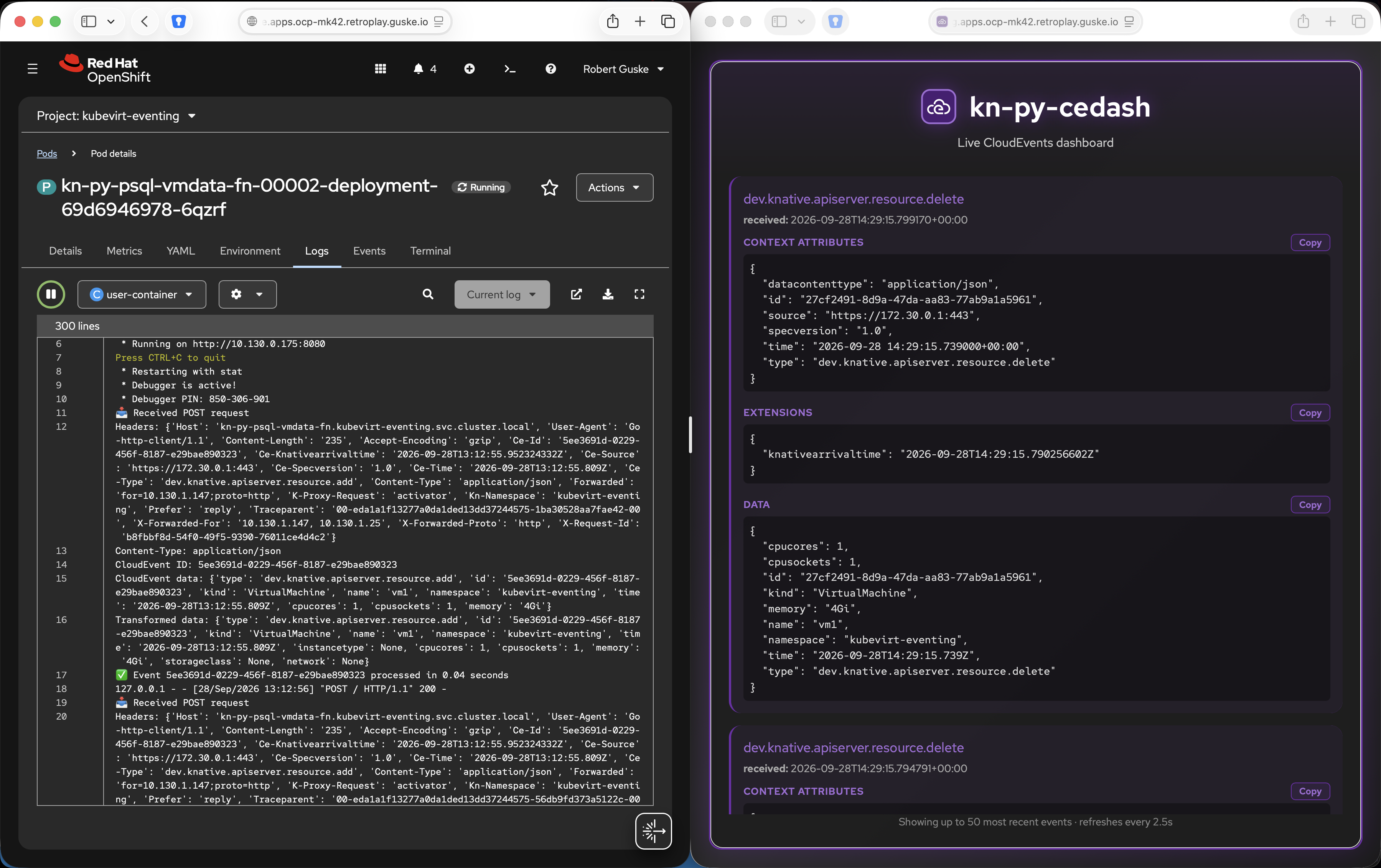
…and then connected with psql to check whether both the adds and the deletes made it into the table:
psql -U postgres -h 192.168.42.3 -p 30432 -d vmdb -c 'SELECT * FROM "virtual_machines"'

Password for user postgres:
                 type                  |                  id                  |      kind      |               name                |     namespace     |           time           | instancetype | cpucores | cpusockets | memory |  storageclass  |       network
---------------------------------------+--------------------------------------+----------------+-----------------------------------+-------------------+--------------------------+--------------+----------+------------+--------+----------------+---------------------
 dev.knative.apiserver.resource.add    | e67576d7-ea91-4886-91d8-7c9d5cd9755d | VirtualMachine | kubevirt-eventing-vm              | dev-a             | 2026-09-25T10:35:40.797Z |              | 1        | 1          | 2Gi    | synology-iscsi | cudn-dev-a-vlan50
 dev.knative.apiserver.resource.delete | c78e98da-c3be-4629-a2b6-37d7ee533839 | VirtualMachine | kubevirt-eventing-vm              | dev-a             | 2026-09-25T10:39:18.584Z |              | 1        | 1          | 2Gi    | synology-iscsi | cudn-dev-a-vlan50
 dev.knative.apiserver.resource.add    | 8cf72cd3-5e9b-4d9a-89eb-6f848db127e5 | VirtualMachine | kubevirt-eventing-vm-instancetype | dev-a             | 2026-09-25T10:40:08.020Z | u1.2xmedium  | 0        | 0          |        | synology-iscsi | default/localnet-51
 dev.knative.apiserver.resource.delete | acdc3eb1-3452-4966-8bc6-6e410b1e5a3c | VirtualMachine | kubevirt-eventing-vm-instancetype | dev-a             | 2026-09-25T10:42:28.178Z | u1.2xmedium  | 0        | 0          |        | synology-iscsi | default/localnet-51
 dev.knative.apiserver.resource.add    | dc07f6b2-57ac-411d-887a-c02e736ff333 | VirtualMachine | kubevirt-eventing-vm-2            | dev-b             | 2026-09-25T10:43:01.155Z |              | 1        | 1          | 2Gi    | synology-iscsi | default/localnet-51
 dev.knative.apiserver.resource.add    | 5ee3691d-0229-456f-8187-e29bae890323 | VirtualMachine | vm1                               | kubevirt-eventing | 2026-09-28T13:12:55.809Z |              | 1        | 1          | 4Gi    |                |
 dev.knative.apiserver.resource.add    | a9dc8142-a283-4699-b22f-797345b28006 | VirtualMachine | vm2                               | kubevirt-eventing | 2026-09-28T13:12:56.118Z |              | 1        | 1          | 4Gi    |                |
 dev.knative.apiserver.resource.add    | a86d954d-9d08-4f32-85d5-d952d5a31ffd | VirtualMachine | vm3                               | kubevirt-eventing | 2026-09-28T13:12:56.208Z |              | 1        | 1          | 4Gi    |                |
 dev.knative.apiserver.resource.delete | 9521b11a-2082-4720-8e2e-e469ad0dd501 | VirtualMachine | vm3                               | kubevirt-eventing | 2026-09-28T14:29:09.953Z |              | 1        | 1          | 4Gi    |                |
 dev.knative.apiserver.resource.delete | 943fc153-bbb5-4327-b38f-032d15af3a30 | VirtualMachine | vm2                               | kubevirt-eventing | 2026-09-28T14:29:13.146Z |              | 1        | 1          | 4Gi    |                |
 dev.knative.apiserver.resource.delete | 27cf2491-8d9a-47da-aa83-77ab9a1a5961 | VirtualMachine | vm1                               | kubevirt-eventing | 2026-09-28T14:29:15.739Z |              | 1        | 1          | 4Gi    |                |
(11 rows)
Three add rows, three delete rows, each carrying the CloudEvent id that made it unique, exactly what the pipeline was built to produce.
Truncate PostgreSQL vmdb
Truncating the database comes in handy if you execute test-runs.
psql -U postgres -h 192.168.42.3 -p 30432 -d vmdb \
  -c 'TRUNCATE TABLE "virtual_machines";'
Wrap-Up
Stepping back, the actual takeaway here has very little to do with VMs specifically. The interesting bit is the pattern: ApiServerSource watching a resource, a Broker routing what it hears, EventTransform trimming the noise, and Triggers filtering by event type before handing off to a function. Swap VirtualMachine for Deployment, Pod, Namespace, or any other Kubernetes resource, built-in or a CRD of your own, and the exact same four building blocks apply.
That’s the real win of going event-driven instead of polling. You stop writing “check every N minutes and diff against last time” scripts, and you start reacting the moment something actually changes.
From here, a few natural next steps come to mind:
- hooking an alerting path onto VM deletion events so someone actually gets notified when a VM disappears
- extending the same pipeline to other KubeVirt resource types (e.g.
VirtualMachineInstance,DataVolume) - use the Kafka-backed
Brokerto get durable, replayable event storage in production environments
Resources
- Monitoring Virtual Machines with Knative Eventing - the original article this post builds on
- rguske/knative-functions/kn-py-vmdata-psql-fn
- rguske/postgresql-statefulset-example
- rguske/kn-py-cedash
- Knative Eventing docs
- KubeVirt
References
-
Red Hat OpenShift Virtualization is a feature of Red Hat OpenShift that allows developers and IT ops teams to run and manage traditional Virtual Machines (VMs) alongside containerized applications on the same platform. ↩︎